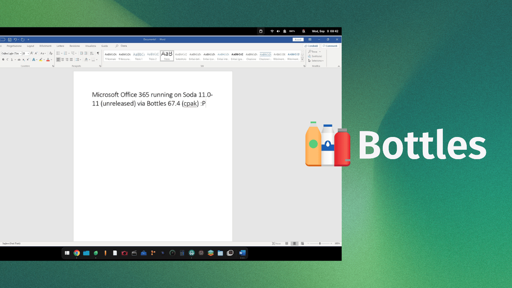
Mirko Brombin, the creator of Bottles, has got Microsoft 365 running on Linux. His posts on X showcase an installation that completes on a Windows 10 or 11 Wine prefix, signs in with his existing license, and launches at least one editor.
He achieved this using two things, an unreleased version of Soda and Bottles 67.4. If you remember, Soda is a Wine-based runner that facilitates easy running of Windows games and applications.
On first glance, what he posted might look like a developer-focused log, but these changes are the foundation of what full Microsoft 365 support via Bottles will one day hopefully look like.
The results of his work
Mirko was able to login into the MS 365 app using his credentials and was able to launch MS Word and use it. Of course that’s not the only thing he got working; since two-factor authentication passed, the suite detected his license, and OneDrive integration was functional.
The memory footprint of the office suite was less than 500MB, so this should be light on your Linux system.
The build he is currently testing is 2608 (20326.20144), which he says is the last build the installer will offer for Windows 10 and 11. And before you get all hyped up, wanting to try this out on your computer, know that you will have to wait.
Soda 11.0-11 (error 404 for now) has no release yet, and the component catalog that ships with Bottles 67.4 stops at Soda 11.0-10. Even the long-standing community request for a Microsoft Office installer in Bottles is still open.
Do we need Microsoft 365 on Linux?
Till date, there’s not been an official Linux desktop build of Microsoft 365, and seeing how Microsoft currently operates, I don’t expect one to appear anytime soon.
What’s been achieved here is remarkable. Once fully implemented, this will help draw in people into Linux, as many shudder at the thought of switching to the platform because their preferred office suite doesn’t work here.
For context, CodeWeavers sells a paid Wine product, CrossOver, and its database still lists Microsoft Office 365 on Linux as “Installs, Will Not Run,” last tested against CrossOver 26.3.0.
Which is why I hope the fix travels further than Bottles. Wine sits beneath every one of these projects, including Soda. So a patch that lands upstream reaches all of them at once, and you would not need a particular runner to get Office working.
Let’s try running some windows only viruses on Linux next.
If people want to run MS Office and Linux allows them to do so, that’s a good point for Linux, whether it’s good taste to do so or not…
But why??? LibreOffice is great, isn’t made by Microslop, and doesn’t use that god-awful ribbon bar.
Make a presentation in libreoffice or onlyoffice, then switch to Microsoft PowerPoint and tell me the user experience, look and time taken is not way better. I like LibreOffice, but if Microsoft office was open source I would 100% use that
People can’t tell their higher ups what software the company should use.
Because people won’t adopt LibeOffice just because you want it
Why would anyone want to run Office 365 on Linux?
Overcoming one more barrier to entry.
Work or school
If your job doesn’t provide you with a company issued computer, you should try to find another job. My wife works remotely, and her employer didn’t give her a computer, so she uses her own laptop and I find that egregious.
They do. I have introduced Linux desktops as a choice for those that can live e.g. with the browser version of office and don’t need our ERP client.
I use my own Windows machine, because they’re ubiquitous, but my employer pays the periodic Apple ransom for iOS application publishing to purchase a Mac for my work, because I refuse to buy Apple hardware anymore. Apple decides when you’re done developing iOS apps with the hardware you buy from them, not you.
My company issued me a computer with Windows just fine. Except for Office 365, everything else I do is much better to have Linux native on it. So they are perfectly content to help me run Windows, I still don’t want to run windows.
I was expecting you to say just use it in a browser, which actually I do 99.5% of the time. However, just last week I had to boot into Windows because of being forced to work a powerpoint presentation in ways the online powerpoint simply won’t touch. Similarly, I’ve heard people speak the same of Excel, but I haven’t experienced that one personally.
Incidentally, booting into that Windows install, the updates took about 6 hours before it was happy. Between Microsoft and my work’s endpoint management, it’s a nightmare to try to maintain the work Windows load. I had a similarly neglected Linux laptop and it took about 30 minutes to chew through an even larger window of updates.
All they said was work or school, they didn’t say anything about it being for personal computers. Getting things like this working makes a business using Linux for their work machines even more viable than it already is.
For context, CodeWeavers sells a paid Wine product, CrossOver, and its database still lists Microsoft Office 365 on Linux as “Installs, Will Not Run,” last tested against CrossOver 26.3.0.
Office 365 does run in CrossOver, just poorly. They’ve also recently dropped support for it in CrossOver 26, and AFAIK CrossOver 27 won’t be able to run it at all.
So it’s good to know that Bottles has effectively replaced it.
Personally, I think this is good. Obviously most people here already use some libre alternative or just access this via the web or dual boot, but most non-computer savvy people are dead set with keeping to what they already use either because of work or simply being more comfortable sticking with what they know.
Plus, there’s probably cases where the web versions aren’t going to be viable. Kind of ironic that so many linux people simultaneously make fun of the ChromeOS workflow where everything depends on browser-based services while dismissing people who can’t switch fully because needing the MS suite with “just use the browser version”.
You know what? That was a great article. Well researched and not too wordy, so I didn’t get bored. If you skipped it and came straight to the comments, you should click it, Adblock or not.
There’s so much slop out here, we should let them know we like this.
Anyway, as for the content of the article… meh, I don’t care about Office but it would be good for Linux in general to have it working.
Do copilot next!
Be gone! Foul Spirit! Take your Co-Pilot and leave this innocent place.
If this was still like 2010 I actually would have thought this is pretty nice but office went to complete garbage just likee everything else MSFT has touched this past decade.
Even on windows I’ve seen random people using libre office instead.
The last time I opened excel it actually died trying to handle my copy paste of a simple list.
Between libre and office in the browser, 99% of my needs are met.
Collaborating on a powerpoint however, it’s very quickly ‘powerpoint application only’, whether I like it or not.
OnlyOffice is on windows and Linux, that’s all I use at home now
I think people should instead work on alternative applications to have compatibility with the file format.
Adobe and MS don’t play fair on that front too.
I have a LaTeX file from 1993 in my archive dir that I can format and print at a whim. It is a technical manua from an uni research hardware project written in Spanish, initially on an ULTRIX or DEC system, and I converted it once to ISO 8859-1 encoding and once to UTF-8.
The founder of toilets has managed to shit his pants in the middle of the living room.
Why is the founder of Bottles compared to a toilet doing shitty stuff? Did I miss something?
Congratulations and condolences
…more the latter than the former I think
Remember that M365 stuff works in a browser too!
I am not going to argue that some people – both creative and technical – don’t have a need for the native apps. If your line of work standardized on a Microsoft product, fair enough.
If you are not one of those people though (and you have a choice, of course) Teams & Outlook work great as webpages, and they have web versions of the rest of the office suite which I assume work fine for occasional work. I’ll usually just try LibreOffice with the file anyway and it works fine.
Yeah. I have chromium installed to use teams as a PWA. Works ok, not great, but that might also be because teams is crap
FUCK microsoft, btw
windows forum instantly announces it’s sloppy, confusing rebuttal. Microsoft 365 on Linux: Why the Bottles Claim Needs Caution
It’s a Masterpiece.
Has Copilot “written” that bs?
It really did read like an AI output. I wouldn’t be surprised if it was punched up by AI.
I tried this for fun myself. Just write a few points what the article is about, what you want the article to sound like and styling, and some technicalities to make it like the other articles. Output 2 variants with different LLMs. Choose one and refine it for a few minutes, until the auto generated images are output. This is the slop generation.