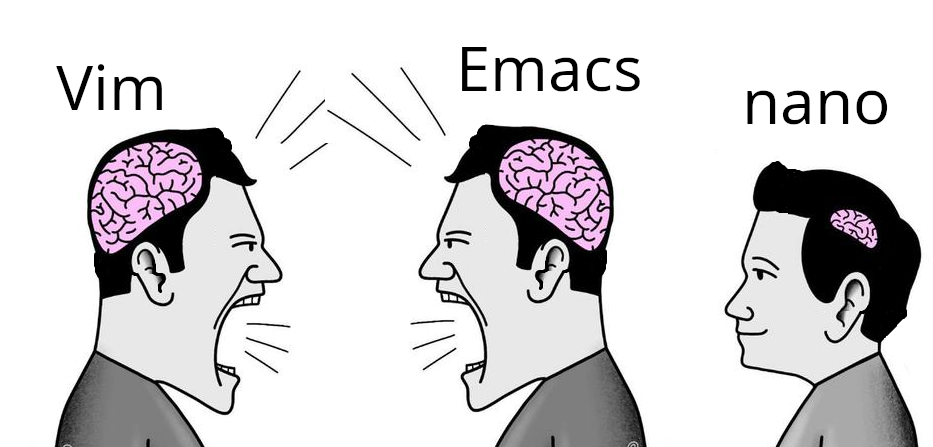
me like use nano. nano say how do thing. nano exit easy.
I use Helix btw
nice! LMK if they ever get that frontend running
You can subscribe to the GitHub discussion, it looks like there are some prototypes but not a definitive GUI: https://github.com/helix-editor/helix/discussions/11783
Ah, my kith and kin. Salutations, ye of excellent discerning taste.

Helix is my favorite, it does everything I want a text editor to do and it’s much more intuitive than vim/nvim. I was never a power user of either so I’m sure it’s missing plenty of functionality that nvim users are used to but it’s perfect for my use cases.
But… Micro is better
if micro so good, why no installed ?
Unga Nano : turn place linux
the best things in life take some effort to achieve
Love it, use it daily. If copy worked properly over ssh I would be so happy but for now I use less if I just want to copy something
Helix:

My computer my choice
There is a right choice and you know it. Stop bring silly and say it out loud!
(Duck and cover, flame war!)
I used some distro with vim back in the day and I just kept using it. I lose my shit when I use something with just nano and my muscle memory tries to do a vim thing.
Same. Makes nano a fucking nightmare.
If I can’t :wq I have a panic attack
Some real talk.
Can we just include the 4 most popular text editors on basic systems??
Like i wanna scream when there isnt my text editor installed on a lightweight distro.
Vi Emacs Micro Nano
For context,
Debian ships with nano and vi Openwrt only ships with nano
Like cant we just include small editors. In a perfect world i would want neovim installed. But i understand its larger and has alot more dependency’s.
So having VI isnt as good but im willing to be reasonable.
JUST INCLUDE VI
the reason i learned vim is because VI is installed by default on almost every distro.
Im tempted to try emacs tho
It’s important to learn how to use package managers. :)
Emacs macros are sooo nice.
EMacs is an operating system masquerading as an editor.
For OpenWRT Nano is a good choice. Nobody spends hours in a text editor on that system. You can ssh into it and use any fancy editor with a million plugins installed on your own computer.
Madness lies in that direction.
No love for vim?
vim is just vi in drag
When I was first learning how to code I was working on some beginner project and couldn’t figure it out. I asked a friend who knew a few things what I was doing wrong and he hopped on my computer, fixed the code then opened it in vim and told me my project wasn’t working because of whatever text editor I was using (I think sublime). So for like a year I hardly learned how to code but I got pretty dang good with vim.
I love nano. I used to do tech support for a Linux-based content management system (before SAaS take took off)… The customer sysadmins were sometimes whichever engineer was volun-told to do it, so competency varied wildly.
I helped mostly with installs. This might be the poor newbie sysadmin’s first time on the command line. Nano was my go-to suggestion for editing config files–all the commands are right there! Much less intimidating than vi or emacs for a newbie.
Nano you can pick up in ten minutes and master in an afternoon. By that time you’re still reading the intro to vim or eMacs.
That has to come from someone who doesn’t know the bliss of micro
Nano is trash.
micro
Ed users are vim lusers on steroids.
Gedit users be like
I use micro. It’s 1000x better.
Doesn’t come standard like nano tho for a lot of distros
barely an inconvenience, you’re one curl away from it
Assuming you have internet access lmao
Nano with a few config options by default?
Pico…I’m going the wrong direction
Ugh. At least two decades I’ve used them and never made that connection. Thank you. And curse you. lol
Peta
I was coming here to say “what about micro?”
Today I learned about the existence of “milli” and “kilo”, both of which are terminal-based text editors! Quite interesting. I wonder if there are any more SI unit prefix text editors…
Holding out for a cursed deca
nano is just a text editor, I use it as a text editor, it has keybindings on screen by default, no need to config or memorise, why bother? (for text editing, not whatever people use vim or emacs for)
Kind of, but not really? Nano by default displays US English(?) keyboard bindings which are different to the keyboard I have, so I still have to have a cheat sheet open when I’m on a system with nano-only editor.
There are exceptions to everything.
I mean, nano is cool I guess.
But just today my colleague asked what parameter add to a configuration file. He asked me should it be before or after this line? I told him before, he added it after. He had to select the line with the mouse, copy the text, go above, paste it, go back and delete the line character by character.
I mean, not too bad; but I was feeling very bad while seeing it happen.
^K Cutand^U Uncut(paste) were on the screen the WHOLE time this happened.“The instructions are on screen at all times!” is only a positive if you follow the instructions, otherwise they are wasting space.
ddp:m-2What does that do?
Moves the current line up 2 lines.
It’s “2” because the syntax is actually “move to after -2”. So if you are on line 20, it will move you to after line 18… Aka line 19