As you can see, it is using 218 MiB at the moment, it is not pre-allocating the whole available space. the 7.70 GiB is the max limit of how much can be used.
It is usually mounted in the /tmp folder. This is a standard practice, since this is destined for temporary files, it will allow fast access, reduce disk wear, and also wipe itself on reboot.
If I wanted to use some analogies, I would imagine RAM is the space on your desk and disk is the drawers behind you.
Everytime the computer shutdown, the desk is totally cleared.
When you work, you have stuff on your desk space, files that you need temporarly are also on your desk because you want to keep them and clear them on shutdown, this is what /tmp is for.
Swap is when you desk is starting to be full, but you still need the data to work, so you have a special part in the drawer behind you that you move stuff that you don’t need right away but want to make some space on your desk. It is slightly slower to access since you need to move from your chair to get it.
it can use up to that number, but it won’t allocate that much when not needed, which is the case here. tmpfs can also use swap, so the maximum space available is system RAM + swap


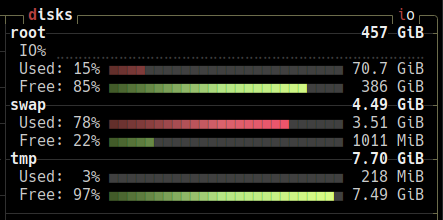
thanks for the reply! does that mean it occupies 7.7gib of the 9.57gib RAM currently being used? or just the 218mib?
As you can see, it is using 218 MiB at the moment, it is not pre-allocating the whole available space. the 7.70 GiB is the max limit of how much can be used. It is usually mounted in the
/tmpfolder. This is a standard practice, since this is destined for temporary files, it will allow fast access, reduce disk wear, and also wipe itself on reboot.so it’s kind of like the opposite of a swap file
If I wanted to use some analogies, I would imagine RAM is the space on your desk and disk is the drawers behind you.
Everytime the computer shutdown, the desk is totally cleared.
When you work, you have stuff on your desk space, files that you need temporarly are also on your desk because you want to keep them and clear them on shutdown, this is what
/tmpis for.Swap is when you desk is starting to be full, but you still need the data to work, so you have a special part in the drawer behind you that you move stuff that you don’t need right away but want to make some space on your desk. It is slightly slower to access since you need to move from your chair to get it.
it can use up to that number, but it won’t allocate that much when not needed, which is the case here. tmpfs can also use swap, so the maximum space available is system RAM + swap